How I Code in 2026 #6: MCP & CLI
🇦🇷 Clickeá acá para leer este artículo en español.
Using MCP1 and CLI2 is the standard way to extend Claude Code and give it more agency. They're two ways for the agent to access things it couldn't otherwise do as an LLM limited to reading and writing files.
CLI
CLIs are programs that run from the terminal. Many tools and services offer official CLIs that let you do from the console everything you'd do from a graphical interface.
Since Claude Code runs in the terminal and has access to bash, it can use any CLI you have installed. The clearest example is the GitHub CLI (gh). With this, Claude can create PRs, review issues, interact with GitHub Actions, and everything else you can do from the command line. Most importantly, it can do all this without filling the context with instructions on how to use REST APIs or other more complex approaches — it just needs to run [cli] --help and that's it.
Another HUGE advantage of CLIs is that you can also create scripts to automate tasks from the console. For example, deployment flows or infrastructure setup, data synchronization, etc.
For instance, I have a script that copies a subset of production tables to my local environment when I need data to test things. But since we have several stages (production, staging, PRs, etc.) the script supports two arguments ./bin/sync_db [source] [destination]. This way I can copy the prod db to staging, or from prod to local, etc. I just need to tell Claude Code that I want it to bring me the production database and using a skill (database-sync) it knows how to call the command, the parameters, and even how to specify certain tables or exclude others.
MCP
MCP (Model Context Protocol) is a protocol for creating servers that expose tools to the agent. The advantage is that being a protocol, how to call and how to receive information is standardized and has specific functionalities for agent interaction (unlike CLIs, whose responses are a universe apart that the agent has to interpret each time it receives a response).
Examples:
- Playwright MCP: for automating the browser and taking screenshots
- Figma MCP: for interacting with designs (I don't use it but I know many people do)
For more examples of MCP servers, check out awesome-mcp-servers.
One "downside" of using MCPs extensively is that to automate from the console you need to call Claude Code headless or some MCP client, which complicates scripts quite a bit and makes processes much slower.
Example: AI-first Game Engine
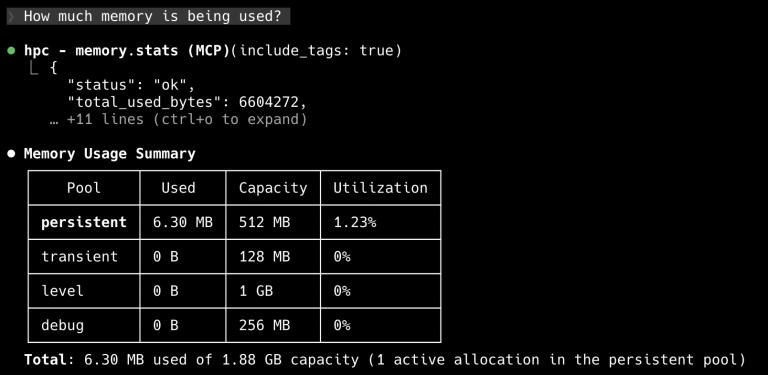
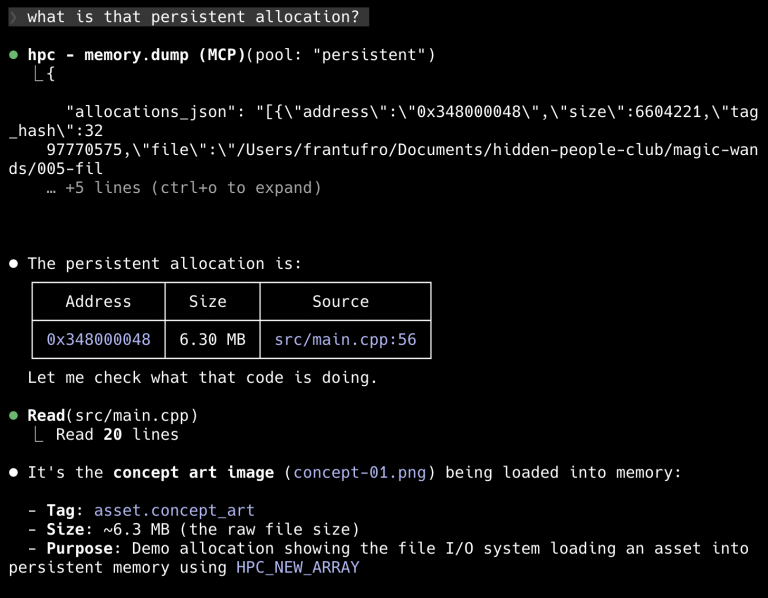
An experiment I'm currently working on is an AI-first 2D pixel-art game engine. I'm adding MCP tools to each subsystem of the engine so I can inspect the game while it's running.
When you run the game in debug mode, it spins up an MCP server that I have configured in the project's .mcp.json. So when the game is running, Claude connects to the MCP and can start asking it questions.
{
  "mcpServers": {
    "hpc": {
      "type": "http",
      "url": "http://127.0.0.1:3090/mcp"
    }
  }
}
For example: how much memory it's using, identifying if memory is being used correctly, seeing metadata about where allocations are happening. All in real-time while the game runs.
Coming soon I'll be adding the ability to take screenshots and do input simulation. The idea is that Claude can not only inspect but also interact with the development build of the game.
What's Next
With MCPs and CLIs, Claude Code can connect to practically any service or tool you need. The extension ecosystem is constantly growing and there are more and more integrations available.
In the next and final post of this series I'll talk about what comes next: current limitations, what I'd like to see improved, and where I think all this is heading.